 |
privacy |
|||||||||||||||||||||
|
Welcome to Orcmid's Lair, the playground for family connections, pastimes, and scholarly vocation -- the collected professional and recreational work of Dennis E. Hamilton

Blog Feed Recent Items 
The nfoCentrale Blog Conclave nfoCentrale Associated Sites |
2009-08-23Productivity: This Is Not a KanbanSince I cleaned up my work space somewhat last March, my attention to productivity techniques and management of my commitments has spiraled into nothingness. My open loops are more prevalent and more open than ever. I stopped working through the startup for Totally Relaxed Organization and I haven’t opened my TROG Bar in months. My only Getting Things Done practice is to empty my in box (except there are 56 orphan items there right now). It’s been so long, I completely forgot that I was ever participating in a Zen Habits Monthly Challenge. Here Comes the New Methodology, Just Like the Old MethodologyI’m going through self-help productivity techniques the way others go through weight-loss programs. And with no better results.
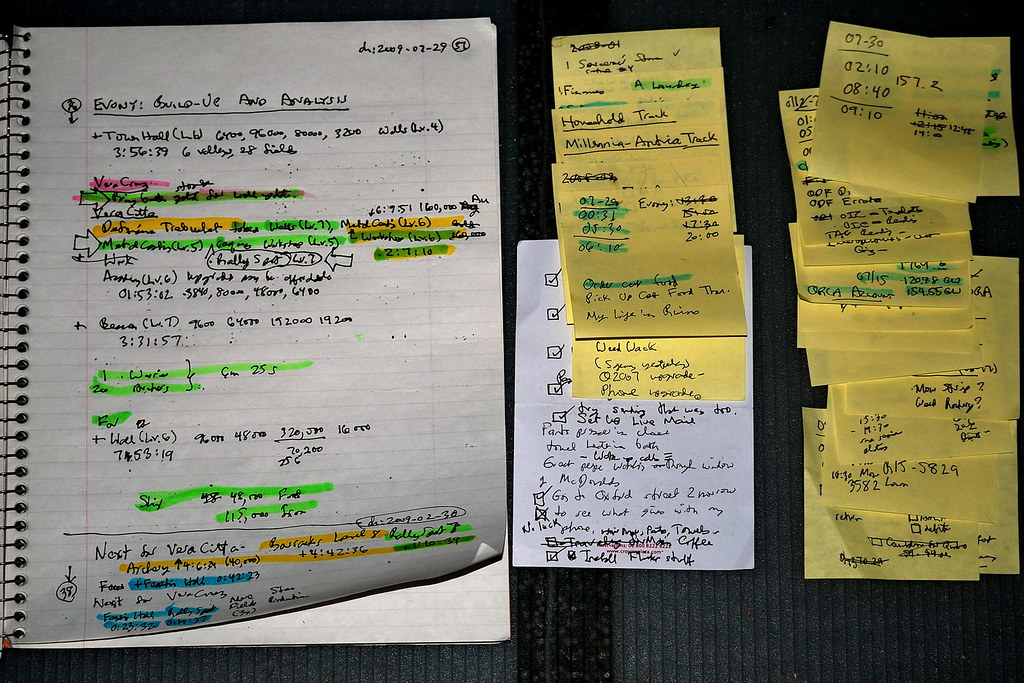
The small white note with the checkmarks was created on a hotel-room notepad in London last May. I’m still carrying it around along with my morass of open loops. There are other places where I keep commitments tucked away on my computer. They are also shuffled around and ignored. I Will Be Fooled AgainI rarely examine any of these items with critical concern for how the tasks are actually to be accomplished. I’d have to face up to their not being done while I am busily not doing them instead. And now there’s Personal Kanban. I’m a fan of David Anderson, although I have no opportunity to apply any of the agile management methodologies. Although I appreciate that kanban methodology has been a powerful instrument in the work of teams, I mostly just glance at the various accounts. The lingo is mysterious and the application seems even more out of reach in my personal situation. That changed when I saw twitter updates from David Anderson and then Jim Benson on the possibilities of a Personal Kanban. I began to follow along and browse through Benson’s series of blog posts on the topic. My buddy Bill Anderson and I created weekly (weakly) checkpoints on taking steps to understanding the kanban methodology from a personal perspective. The Essential Reality CheckI see appealing features after an initial look at Personal Kanban. I want those features in raising the bar (now so low) on my personal productivity and effectiveness. I also realize that my application of Personal Kanban is doomed to the dustbin of forgotten methodologies. The common factor in the recurring result of my experience is me. Not the methodologies. To have a different result, I must work differently. Where I StopAfter a few hours and days of mixed success, I stop looking at the structure that holds my current commitments. I just don’t look there to true myself up. I indulge distractions and eventually the new methodology has disappeared. Lately, I seem to end up in worse shape than before I began. But before that point, I stop in another way. All of the recent methodologies I have examined start with housecleaning followed by housekeeping. I take out some trash, but never all of it. I cling to it and don’t let it go. Or, I don’t want it but cleaning it out is overwhelming and I never create an occasion for accomplishing that. Or I clean up piece-meal, insisting to myself that when I get things organized, I can then be organized. Mostly, I get distracted from all of this and eventually forget to clean up the mess, which remains in its piles around my office and elsewhere in the house. Being SlimyI was in a conversation on how I am the poster-child for methodology failure. Here are my other indulgences:
OK, Where From Here?It was suggested that someone needs to take a kanban board down and hit me over the head with it. I need to be the one to do that. Plus empower others to be ruthless with me when I go off the track. I am going to apply Personal Kanban in my life. It will be fun to deal with the details of the techniques. But the real accomplishment will not be in messing around in the technical and conceptual nuts and bolts. It will be my stepping beyond my automatic approach and having Personal Kanban win for me. If I fall down, I will get up and keep dancing. Labels: cybersmith, productivity, trustworthiness
from:
2009-06-19I Blog, Therefore I AmTechnorati Tags: Orcmid's Lair, Professor von Clueless in the BlunderDome, Numbering Peano, Pursuing Harmony, Spanner Wiingnut's Muddleware Lab, Orcmid's Live Hideout, blog themes
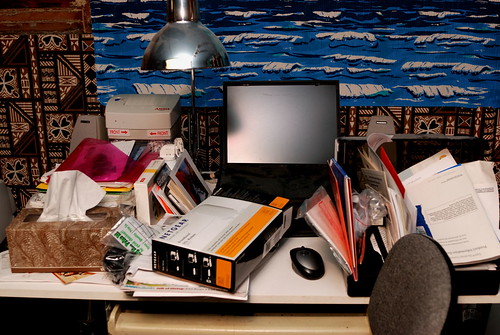
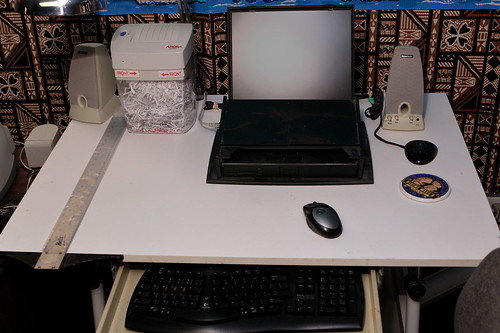
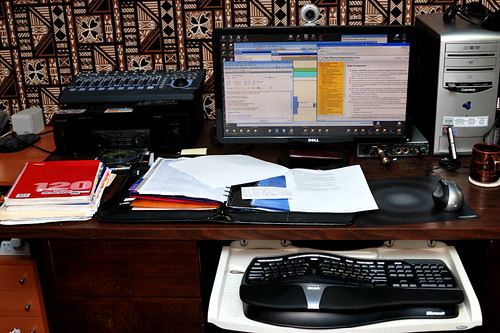
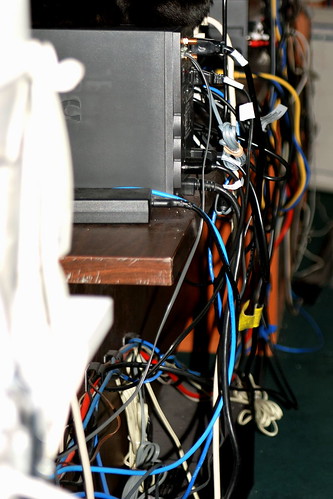
I have six blogs to my name, where I set the purpose and content of the blogs. These are various expressions of me. There’s one other blog that is an expression of my partnership with Vicki and her vocation as a potter, Millennia Antica: The Kiln Sitter’s Diary. My presence is as web master and technical support, along with contribution of my perspective on some of the activities that I participate in. But the purpose of that blog is to be part of Vicki’s expression of her vocation and love for pottery. Labels: computers and internet, cybersmith 2009-03-03Productivity: Cleaning Up the WorkspaceTechnorati Tags: Productivity, GTD, TRO, Getting Things Done, Total Relaxed Organization, workspace cleanup At Seattle MindCamp 5.0 at the end of November, 2008, I resolved to finally upgrade my productivity support and take some ground cleaning up my workspace. To fit with my work practices and record-keeping approaches, I started the Total Relaxed Organization on-line training, along with installation of the TROG Bar Outlook-integrating productivity tool. One problem with a major productivity overhaul is the need to clear out all the junk and reconstitute an inviting workspace. My workspace was in terrible shape, and I had no way to clear it all out and rebuild it. Instead, I am involved in a steady shuffle of reorganization. I have been slacking off about that, in the midst of other commitments, but I have made considerable progress in the heart of my office work area.
Lap-Top Server. This 1998-vintage Dell Inspiron 7000 just keeps on ticking. It is too decrepit for lap-top usage, with a failing screen hinge and broken keys and mouse buttons. The machine works just fine as a local web server and Visual Source Safe repository that are used together for web site development and back-up of software projects. Once the table surface was cleaned up, I also upgraded the laptop from Windows XP SP1 (!) to Windows XP SP3, with all junk cleared off and regular clean backups. I only operate the machine directly when I need to FTP updates from the development server to the hosted web sites and when I need to backup the hosted blogs and comments onto the development server. I am now poised to retire this machine, once I have successfully migrated the server and source-code-control functions to my Windows Home Server.
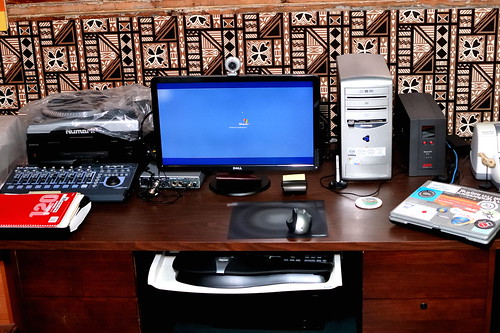
Desktop Media Center PC and Development System. My main desktop system was on a crowded and cluttered desk. I have reduced the clutter by having just the one in-box and a separate set of working files (not shown). On the left, I moved the audio control surface and my audio dock to an easily-accessible position. My audio receiver is now a platform for the turntable I use for rescuing old vinyl records. Although this does not provide much more open work surface, that will improve when the docked Tablet PC can be moved to the location of the Laptop Server.
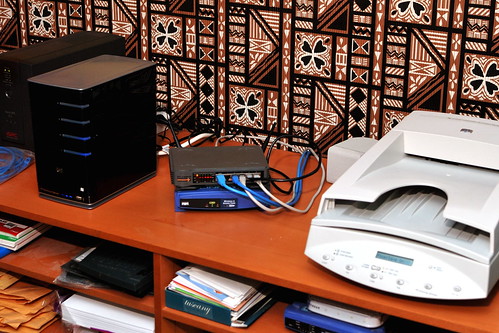
Media Table and Network Center. By parking the turntable atop the audio receiver, I was able to bring the scanner over beside the desk.
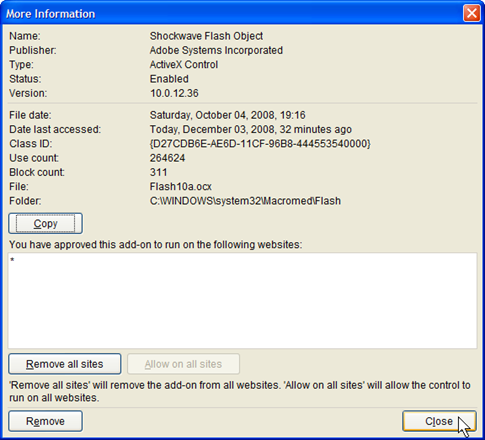
What I have accomplished is having a smoother setup and more comfortable operation in that area where I spend most of my working days. I have extensive electronic materials that I am now reorganizing, including a gigantic collection of incomplete Outlook tasks that I am pruning down a little at a time. The recommended approach for any Getting Things Done or TRO cleanup is to simply trash that material. Those are also records and research materials for me and I am going to retire them cleanly, as painful as that can be. Labels: cybersmith, productivity, web site construction 2008-12-07WTF: Umm, Flash 10 Detection Not So SimpleJust after midnight coming into Saturday, 2006-12-06, I unloaded my sad experience with Flash Player detection since updating to Flash 10 in IE 8. The details are in the article “WTF: The Adobe Flash Version 1x Crisis.” After that, I created a question on Stack Overflow to explore the geek side of the problem. I just confirmed that the problem is more subtle than my original suspicions: Flash 10 Detection works in IE 8 beta 2 when I’m elevated to admin and it fails on many (but not all) sites when I am running as a Limited User Account (LUA). So I am seeing what may be a permissions problem that only shows up for users who browse as limited users on Windows XP SP3. This leaves two mysteries: (1) what is the permissions problem and (2) why does Flash detection work on some sites anyhow? Technorati Tags: Adobe Flash, Software Version Checking, software usability, software engineering, distributed applications, confirmable experience, system incoherence, StackOverflow, cybersmith Not Exactly What I Was Looking ForThanks to a lead from RoBorg on StackOverflow, I was given some useful leads on Flash Player detection resources. This led me to experiment with Adobe Flash Player Detection Kit 1.5. The Kit’s sample for client-side (that is, in-browser) detection failed, suggesting to me that this would be good code to explore for isolation of the problem. I began to conduct an autopsy on Adobe’s sample code. My first discovery in using the Client-Side Detection sample code is that the failure to detect Flash 10 is not about an incorrect comparison for desired-or-later version. The client-side detection doesn’t get that far. An internal procedure, GetSwfVer, for finding an installed version of Adobe Flash Player is unable to detect any Flash Player at all. So it reports that it failed to find any version installed. This had me suspect there is something going on with the Windows Registry (where I can see that there are entries for ShockWavePlayer, the Macromedia name that continues to be used). I can also see that there is an entry for Flash Player version 10. Internet Explorer also shows that it has the player installed and enabled when I check the Tools Manage Add-ons menu selection for all add-ons:
My plan is to dissect the GetSwfVer JavaScript and bench-test it by parts until I see where the procedure is failing to find the installed Flash Player control and report its version. I also have observed that the Adobe Flash Player Detection Kit and recommended detection methods have a poor reputation among some developers. I have no reliable evidence to support that. I will, however, also check into the recommended alternative, <swfobject>. If I find that it works where the Detection Kit Client-Side solution does not, that will be worth exploring for what the workaround is. There is a handy article by Bobby van der Sluis on the Adobe Development Center. The sample files there should get me started the same way I have made use of Detection Kit 1.5. Another Country Heard FromMeanwhile, I noticed that there is also support for Google Chrome. Chrome is the other in-beta browser I keep around to compare with IE 8 beta 2 results and to sometime use as an alternative for some sites that I just can’t get to work with IE 8 beta 2, even in compatibility mode. I managed to install Flash Player 10 for Google Chrome today. It turns out that Google uses plug-ins, not ActiveX controls, and the same plug-in that works with FireFox and other browsers sharing some of the same code base works with Chrome. It is actually tricky to get Chrome to install a plug-in, but I managed it.
This is a plug-in, not an ActiveX control, so its detection and use can be rather different. Nevertheless, I confirmed that Chrome will play Flash 10 for all of the sites where I am unable to have it work for Internet Explorer, including YouTube and the CBS Television NCIS program page. That solves my immediate desire to catch up on programs that I’ve missed. That makes me happy, as a program watcher. I still want to get to the bottom of this and complete my diagnosis of Flash Payer detection difficulties with Internet Explorer. A Small Matter of PrivilegeBecause I had to be running as administrator to install the Flash Player Plug-in, I first tested Chrome-based Flash Player detection and video playing while my Windows XP SP3 account was still elevated to administrator. Everything worked. As an afterthought, I also attempted to use IE 8 beta 2 under administrator privileges. It works!
But when I restore to my account to Limited User, it doesn’t:
Hmm, it doesn’t pick up the icon in the address bar either. IE 8 offers compatibility mode for this page, but it doesn’t make any difference to pretend to be IE 7 here. OK, What’s Next?I have solved the problem of being able to continue watching my favorite Internet-available programs. I have not solved the problem of client-side detection in IE8 and what about account privileges has detection work where it doesn’t when I am operating as a limited user. I will continue my dissection of available client-side code to isolate the problem and determine how some sites manage to get around the limitation I am experiencing. This business of having applications work while I am administrator and not as limited user is not new. I tend to associate this with my upgrade from Windows XP SP2 to SP3, and it may be related to more-recent security updates. I cannot be certain. I do know I have been putting up with this for some time. I am hopeful that if I get to the bottom of this one, I may be able to solve other problems (such as having a NewsGator Inbox plug-in for Outlook that only runs when I am administrator). As far as the specific problems of reliable Flash Player detection in IE8 go, I will continue to work on that as well, but not with the same urgency. Also, because anything I do from now on will be very geeky, I will provide an account on places like Professor von Clueless in the Blunder Dome and Stack Overflow, as appropriate. The Incoherence of Confirmable ExperienceAlthough I have wandered off into the weeds on this exploration, there are a number of examples of system incoherence, something where the web is a bountiful source of examples. The difficulty of confirming my experience and isolating it to something that is reproducible by others is also well-demonstrated here. I am also mindful that the reason there is no great hue and cry over Flash 10 detection problems is that I may be part of that select and small population of devoted LUA users who are seeing the problem at all. This is, of course, fodder for a different sort of rant. Labels: confirmable experience, cybersmith, interoperability, system incoherence, trustworthiness 2008-10-08Geek Dinner Collection: 2007-09-12 Hanselman EventTechnorati Tags: orcmid, geek dinner, Scott Hanselman, Redmond, Bellevue Crossroads, bloggers, Microsoft [This 2007-09-13 Orcmid’s Live Hideout Post is being recovered from my Live Spaces blog for improved preservation and consolidation. While it is a way to appear to be blogging more regularly, it is also a serious preservation attempt. I want to move off of Live Spaces anyhow, since I can now accomplish all of the same things in a place where I have complete backup and preservation capability. It also happens that there are some threads that were partly over there that I want to build on over here. I did not know that this was more urgent than I realized. It seems the latest Windows Live Writer (or Live Spaces itself) will not let me retrieve previous posts beyond the latest 20. So I am literally scrapping this one off of the blog page. We’ll see how it goes. Scott Hanselman hosted another of his Bellevue Crossroads Geek Dinners this past Monday, 2008-10-06. It is appropriate to retrieve this message while I stall my preparations for a response to Hanselman on a different topic.]
My snapshots from the casual dinner meet-up called by Scott Hanselman with swag by Charlie Owen. Here I play with the thumbnails that Flickr provides, along with the ease of using photos in posts via Live Writer. I do fancy my Live Writer, yes I do. [update 2008-10-09: Along with movement of this post to Orcmid’s Lair, there is also a confirmable-experience moment concerning these digital photos. They appear much darker than on my previous display. This is a noticeable concern and a complex confirmable experience situation. There’ll be something more coherent about that after I manage to calibrate my new monitor for reliable digital-photography work. Oh, I’m also making use of the categories feature and have abandoned any effort to keep cybersmith posts all in one place. Scary.] [update 2007-09-13: Arun Bhatnagar has put his photo set on Flickr. They provide a great demonstration of how the Crossroads Mall building is unusually inviting for socialization and informal meetings.] Labels: confirmable experience, cybersmith, geek dinner, photography 2007-10-08OpenOffice.org: Another Hot Tip![update 2008-10-13 The installer bug observed here is not specific to OpenOffice.org, it seems to be specific to installers. I have not examined this enough to see which installers do this, but I have seen the identical problem with installers of other software. In all cases, the software will correctly place a single-user install under the user who is running the install. But the dialog identifies the wrong user, apparently always showing the User ID for the first user created on the machine.] Technorati Tags: orcmid, OpenOffice.org, OO.o Installer Bug, confirmable experience, trustworthiness When I installed OO.o 2.3 on my sister's computer, I was disturbed that it kept offering her admin account as the single account it would install under, even though we were not running the installer under that account. At my XP SP2 system at home, I installed the same version and I did not have that problem. This time it did name the account I was using, even though it was not my normal administrator account. It was, however, the first account that had been set up on my machine, as was the case for admin on my sister's machine. So I tried again, this time on my Tablet PC and Windows Vista Ultimate. For variety, I also used the OO.o 2.1 Novell edition, installing from CD-ROM. There, I ran into exactly the same problem. I was presented with this dilemma:
Once again, me is not admin. I am doing this install from my standard-user account (SUA). But just to see what would happen, I took that option anyhow. Guess what: This dialog is lying. It will install only for the account being used. The bug is that it doesn't present the correct account name. The behavior is actually correct. So if you are attempting to install OpenOffice.org 2.3 (or the 2.1 Novell Edition) only under the account you are running in, you can ignore the incorrect account name. It will do the right thing. The next time I assist my sister in adding an OpenOffice.org update, I'll be sure to uninstall the current version and then install the new one only for her standard account. Now, you might wonder what the fuss is all about. If you are as obsessive as I am about computer security, you might want to omit all but pure administrative applications from the administrative account, and only ever use the administrative account for essential administrative operations. This means that to have ordinary applications install properly in the ordinary accounts where it is safest to run them I elevate my standard-user account to an administrator account just long enough to install the software and run it the first time under the standard account. This gyration is required because many programs expect to perform final administrative setup operations on the first execution. Setting of registry entries and creation of application data, plus other details, may be specific to the account that is used for the install. I will usually discover the firewall conditioning that is required upon the first execution. From then on, I can use the program as a standard user. When certain programs (e.g., Second Life) install for all users with no other option, I will remove the shortcuts and links placed on the "All Users" desktop and startup menu and place them in the profile information of my standard user account. This is just a little preventative against my foolishly using recreational software from my administrative account. [update 2008-10-13 Moved this post from Orcmid’s Live Hideout to Orcmid’s Lair for better preservation and tie-in to other confirmable-experience and cybergeek topics.] Labels: confirmable experience, cybersmith, interoperability, software usability 2007-09-24OpenOffice.org: Installation Hot Tip!
Technorati Tags: orcmid, OpenOffice.org, Open Documents, Microsoft Office, OpenOffice.org Novell edition, OOXML, ODMA [2008-10-08 Another preservation of an Orcmid’s Live Hideout post. This is to have the collection under one blog roof and also along the proper timeline. These posts will not show up the recent-posts lists of surrounding posts, but they can be found in the category archives. My blog archive list has run out of gas and I need to find a way to bring it forward.] Yesterday, I gave my tale of woes around installation of OpenOffice.org 2.3 on my sister's (and then my) computer. Here's the key take-away as a Hot Tip!
[listening to: Pink Floyd, The Wall (1994 Digital Remaster) from Amazon MP3 in Windows Media Player 11 on Windows XP] Labels: confirmable experience, cybersmith, software usability 2007-09-23Open Office Not Ready for ‘Just Plain Folks’Technorati Tags: orcmid, OpenOffice.org, Presumptious Software, Using Office Documents, Microsoft Works, Microsoft Office, Vista Home Premium
[2008-10-08 This is another Orcmid’s Live Space post scraped for placement here so that I have a preservation of it. I have put it back in the Lair at the same date (I hope) because it involves an old version of OpenOffice.org and I have not confirmed whether later versions have the same problem. The lesson is important to retain in case I need to bring it up again.]
Her OpenOffice.org Sweet SpotI did not include any Microsoft Office software when I ordered the computer. It came with Microsoft Works by default. My sister, a retired elementary-school teacher has an occasional need to interchange Word documents and, on rare occasion, documents of other Microsoft Office applications. Even though Works no longer includes a version of Microsoft Word, she didn't find it worth increasing the cost of her system from its under-$600 sale price just to have a version of Microsoft Office. I suggested that we set her up with OpenOffice.org for her routine use and as a way to open and create the simple Microsoft Word and other documents that she encounters in her volunteer work. Now that her system is up and running on broadband, it was time to install OpenOffice.org. Uneasy Moments Installing OpenOffice.org 2.3I took her through the download (the site is not novice-friendly and she was thrown by the donation appeal) of the recently-released OpenOffice.org 2.3 version ( a reminder to me that people come to sites for a particular purpose and distractions are unsettling, especially when they are not sure what is going on). It was also distracting to me that the download page says the current stable release is 2.2.1 when I know the download is 2.3 The download went well over her 7.5 Mbps DSL connection. We created an Internet Downloads folder in her Documents, and added an Open Office sub-folder to store the download and anything else in. It was my sister who asked for the folder organization and named the folders that would help her know what's what. I don't use my documents folder for this, but I realized this would work for her: We already set up Windows Live OneCare to save her entire Documents folder on backups, so the downloads of installs would be backed up too. That's handy. There were a number of odd things in the installation process. But we worked our way through it. I think she might have balked if I hadn't been piloting. She actually reads through EULAs (hey, she's my sister), and the LGPL 2.1 is weird enough for a normal user that she might have been distracted by it. The LGPL 2.1 is not really addressed to users that don't develop software and have no particular understanding or concern for the manifesto that occupies most of the text. (She also knows how to create strong passwords and is very careful visiting web sites and installing software. I am very impressed with what my sister has taught herself about safe computing.) When the option to make Open Office applications be the defaults for .doc, .xls, and .ppt files, we checked those boxes because this is going to be her only means to operate with those documents. Then we stumbled on a bug where OpenOffice.org would not install for just the account we were doing the install under. It kept saying that the "this account only" case was for the admin account and not the personal account we were logged into and performing the install under. Not wanting to have it installed only under admin, we finally had to allow it to install for all users to be sure she could use it from her ordinary account. That is not what either of us wanted. The installation completed successfully. The first-run of OpenOffice.org Writer (with even the names of these applications, with the .org extension, being too geeky for plain folks) forced her through a second acceptance of the EULA (just the LGPL 2.1 license and disclaimer) that requires you to scroll to the end before the "accept" button is activated. If you didn't know that, you'd be stuck right here. Anyhow we did that, and went to the OpenOffice.org site to "register." At the invitation to complete a survey, she closed the browser instead. All right, sis! What's This Crap Here?We did some display-setting adjustments and admired our handiwork on the wide-format LCD display of the new system. I suddenly noticed that there was a folder on the desktop left over from the install. When the downloaded "OOo_2.3.0_Win32Intel_install_wJRE_en-US.exe" file announced that it was going to unpack the installation setup into a folder, I failed to notice that the default choice for the setup files was on the desktop. So we had a stray "OpenOffice.org 2.3 Installation Files" folder cluttering up her desktop. [If Dare Obasanjo reads this on return from his honeymoon, he'll know exactly the trouble I'm about to get my sister into.] Oh Professor, Don't Touch That Button! ... OopsHaving one geek gene (but not two), I saw no reason to keep 109 MB of installation files lying around, especially on the desktop. We are already keeping the original 120 MB download file so that can be used to re-install OO.o 2.3 if necessary, right? I deleted the folder from the desktop. Nothing bad happened (yet). Satisfied, we went shopping, had dinner, and I returned home. Emergency, Emergency, Please Read My Letter!Two days later, after my usual weekly tune-up process, I decided to update my OpenOffice.org 2.0 configuration to OpenOffice.org 2.3 also. I wanted to see if the same glitches happened for me, and confirm that the default for Save and Save As ... of documents opened from Microsoft Office formats was to store back in Microsoft Office format. It is, so my sister won't have to do anything special to round-trip Microsoft Office Documents that land on her computer. But I also found out that those folders of Installation files are needed (well, about 6MB of them are needed) if you ever want to remove or update a version of Open Office. I didn't save mine and my OpenOffice.org 2.3 would not install. Before I managed to get that to work, I had even crippled the existing OpenOffice.org 2.0 software and I could neither remove it, upgrade it, or use it. Three hours later I stumbled back from my near-death experience with a correct upgrade. It was a close call. It is also a very stupid installation procedure. Stupid, stupid, stupid. So, here is how my sister gets out of having any future update or removal of OpenOffice.org 2.3 crippled: From: Dennis E. Hamilton So I installed it on mine (I had an older version already installed) and discovered some difficulties. Here is what you need to do. 1. While in your regular account, open your recycle bin. Just double-click on the icon on your screen. 2. You are looking for a folder with name "OpenOffice.org 2.3 Installation Files" 3. When you find that folder in the recycle bin, don't look inside. Just right click on it. 4. On the little menu that comes down, click "Restore". 5. The folder should then appear on your desktop. That is where I deleted it on Thursday. 6. You need to keep this folder. - - - - - - - It is just stupid that they put it on your desktop and it is also stupid that you need to keep the whole thing around. However, we will do the easy thing and hold onto it. Otherwise, you may have trouble updating OpenOffice.org or even removing it in the future. (I learned this the hard way on Saturday.) Here is my recommendation for putting it away out of sight in a place where it can be found later. 7. Open your "Documents" folder. 8. In that folder, open the "Internet Downloads" folder that we created. 9. Open the "Open Office" folder that we created there (I don't remember its exact name). 10. Shrink or adjust the window that you have open so you can also see the "OpenOffice.org 2.3 Installation Files" folder icon on your desktop. 11. Drag the folder icon into the opened-up "Open Office" folder. (Dragging is by putting the mouse over the icon and holding down the left-mouse button. While still holding down the button, move the mouse cursor over to the document area of the "Open Office" folder above an open space. Release the mouse button. In a moment, the folder should show up inside that folder and no longer be on your desktop. Problem solved. You will need to remember this the next time you install an update for Open Office. We'll worry about that then. 12. If your recycle bin has been cleaned up and the Installation Files folder is no longer there, something more elaborate has to be done. I'll want to come over to work through that with you. For now, I'm hoping that you find it in your recycle bin and that the above procedure makes sense and works for you. If you are uncomfortable doing this, I can talk you through it on the phone and confirm what you are seeing at each step before going onto the next. Love, - Dennis Labels: confirmable experience, cybersmith, software usability |
|||||||||||||||||||||




















|
You are navigating Orcmid's Lair. |
template
created 2002-10-28-07:25 -0800 (pst)
by orcmid |