 |
privacy |
||||||||||||||||||||||||||||||||||||
|
Welcome to Orcmid's Lair, the playground for family connections, pastimes, and scholarly vocation -- the collected professional and recreational work of Dennis E. Hamilton

Blog Feed Recent Items 
The nfoCentrale Blog Conclave nfoCentrale Associated Sites |
2010-01-06Microsoft Office 2010 Coming to Our HouseTechnorati Tags: Microsoft Office, Office 2010, Tablet PC, SOHO Computing, Dekstop PC, Windows 7, Microsoft Works, FrontPage, OneNote I just noticed the reaction to the new Microsoft Office 2010 packaging and price structures in posts by Mary Jo Foley and Ed Bott. Although I despair over being a Microsoft outlier-customer with the disappearance of some of my favorite products, the moves in Microsoft Office packaging and availability may be just the ticket for our household. The announcement is particularly interesting because our Office 2003 installations are a little long in the tooth and it would be good to upgrade, especially as we move to Windows 7 64-bit configurations over the next several months. (Our first Windows 7 64-bit machine is Vicki’s new laptop and it is clear that is the migration path throughout the household SOHO network, despite the need for at least two more hardware replacements.) Our Long Microsoft Office RomanceI operate a Small-Office, Home-Office (SOHO) wired network. Both Vicki and I are devoted to Office 2003 on our individual business desktop and laptop machines. I obtained the two requisite Office 2003 Professional copies by adroitly paying $99 each with one-day workshops included. (Actually, the software was given out as premiums for attendance at the two $99 workshops. I doubt there will be such an opportunity again although I am on alert.) I happily install OO.o on family-member machines where there is limited need for Microsoft Office capability beyond occasional import/export of simple documents in the big-three formats, Word, Excel, and PowerPoint. That doesn’t work here because of personal preferences and, most of all, because of Outlook. (We each rely on FrontPage too, and that is a more-difficult problem.) Office 2010 SeductivenessWe are devoted users of Outlook and have no desire to change that. There are Outlook 2007 features that I want and I’m sure Outlook 2010 will improve on that. I was despairing of what it would take to have us both move up to a current Outlook, with or without upgrading the rest of Office. (I also have technical reasons, in my work on the OOXML and ODF standards, to have multiple versions and beta releases of Microsoft Office and ODF-based office-productivity suites lying around, a challenge that is leading me to put a heavy-duty virtual-machine configuration in my near future. That outlier requirement will also improve my ability to develop for multiple platforms.) If there is reasonable $199 download-pricing for download editions of Office 2010 Home & Business, our SOHO computing needs will be satisfied by two copies, one for Vicki's business use, another for mine. (I may have to go the $249 package route to have it on my laptop plus desktop, while Vicki consolidates into a laptop-only-plus-network computing life, something I should be considering as well, now that I look more closely.) This will also go well with our finally upgrading to Windows 7 64-bit Home Premium (Windows 7 Ultimate for my technical needs) on all non-server machines. An Appealing Starter Case for AllAlthough I probably won't run into it myself, the Microsoft Office 2010 Starter edition via OEM installations would also eliminate the need to install OO.o on new machines for relatives, except to the degree they prefer to have it for whatever reasons that matters to them. It should now become unnecessary to purchase a richer version of Microsoft Office simply to handle occasional Word and Excel interchange plus Goodbye Microsoft WorksIt looks like the Microsoft Works and Office Home and Student trial-edition crapware can be gone for good. (I am wistful about the disappearance of Works, because it was all I needed on MS-DOS and early versions of Windows. I gave up on Microsoft Works when it became more important to have what employers and clients used along with some peculiar outlier importance of Microsoft Office in my support of document-management technology.) Meanwhile, Vicki has no tolerance for Microsoft Works (and may be unhappy adjusting to the Office 2007-introduced user interface too). I still have some old archives in Microsoft Works documents that I had better find out how to upgrade before they are no longer readable anywhere, too. Hello OneNoteAnd finally, I note the prevalence of OneNote in the Office 2010 packaging. I have withheld my use of OneNote on other than Tablet PC applications because of its narrower availability and the absence of a public standard for the format. I stopped using OneNote on the Tablet PC on realizing that I don't go through the extra effort of transferring OneNote-authored material to non-OneNote machines and the material I have is now locked-in on the Tablet. Later Tablet PC note-taking was done with Windows Live Writer instead. With OneNote now a stock component of Microsoft Office, I can reconsider my use along with the SOHO upgrade to Office 2010 (perhaps including a Windows 7 Tablet PC if I can find a reliable and economical OEM source). Update 2010-01-06T22:30: I was over-eagerly expecting the Office 2010 Starter to include some form of PowePoint. That is not the case, but I presume viewers will still be available for download. New Issues to Contemplate: It seems that affordable laptops don’t have provisions for easy swapping in as desktop machine by using an external monitor, closed cover, and external keyboard and mouse. However, a tablet PC can operate flattened out in tablet mode while slide out of the way in an appropriate “docked” arrangement. I must look into that. Until I started writing this post, I hadn’t looked at having a laptop rather than desktop as my all-purpose machine. This is really about having Outlook running in only one place and being able to travel with it. In non-Outlook work, server-mediated replication and synchronization is workable. I need to explore that much more carefully. Figuring in an eventual upgrade to a 30” monitor for desktop work may also create some conflicts with the most external monitor that a laptop/tablet is likely to support. I will still need a desktop system so smooth choreography of any dance between desktop and laptop needs to be understood better. Labels: computers and internet, interoperability
from:
2009-03-28Software: Rust Never SleepsTechnorati Tags: Office 2003, Windows XP, end of support, software obsolescence, Document Freedom, interoperability, open standards [My favorite track from that album has always been Hey, Hey, My, My (Into the Black). Now I can replace that long-lost LP track here, but the MP3 resampling seems to lose the beauty that I found in the carefully-crafted overdrive and tonalities of the original.] When it comes to technology, I tend to be a late adopter, despite the Tablet PC running Windows 7 beta just off to the right on my desk. Or maybe I am a sporadic adopter. Old Software Never Dies, It Just Quietly Rusts AwayIn September 2008, I retired my last desktop machine still running Windows 98. It had Office 2000 also. The biggest concern was moving all of its peripherals and exotic software to my Media Center PC with Windows XP SP3. With that accomplished, I managed to rearrange my systems and introduce a Windows Home Server. The WHS (an HP MediaSmart Server) had been sitting in its box for over a year while I nerved up for those changes. The WHS is based on Windows Server 2003, not anything more recent. My oldest machine is still the 1998-vintage Dell Inspiron 7000 laptop that, shipped with Windows 98, now runs Windows XP SP3 and remains a faithful little web-site development machine with its local IIS, FrontPage extensions, and Visual SourceSafe. I am looking into a progression by which I incrementally move and confirm those functions on the Windows Home Server. Then I can retire the Inspiron before it finally succumbs to entropy death. Since every production desktop machine in this 4-computer + server SOHO operation is running Windows XP SP3 and, if used for e-mail and documents, Microsoft Office 2003, I am moderately concerned that those software products are now at their end-of-support time limits in April, 2009. (The Tablet PC normally runs Vista and even has Office 2007, but for now it is running Windows 7 beta for my evaluation purposes. I expect to restore Vista at some point after the Windows 7 Release Candidate arrives and then expires.) I am not overly concerned. As indicated here, security updates (including Outlook junk-mail filter updates) will continue to be available for Office 2003. In general, there will be security fixes and on-line self-help available out another five years here in the United States. I have no plans to update production work off of Windows XP SP3 and Office 2003. That can change, but I have another five years to sort it all out. A great deal will depend on future support for peripheral equipment and compatibility with the Windows Home Server and the way I develop and maintain web sites. While my frugality around upgrading is not heartening for PC manufacturers, software companies, or the automobile industry (having kept my last vehicle for 18 years), I think it is representative of the general tendency to not fix things that are not broken. It is also an useful reminder that a system lifecycle for its users is quite different than it is for its suppliers. Freedom for Rusty Documents?At the same time, I know that I need to look at the degree to which my documents and digital materials are preserved beyond the life of Office 2003, FrontPage 2003 (RIP), Visio whatever, OpenOffice 2.4, Nikon Capture, etc. How “free” are my documents, and how much are they truly mine? I already have the Microsoft Office Compatibility Pack and its support for the OOXML formats as an Office 2003 add-on. I suspect that OOXML will be supported for a very long time. I am not so sanguine about the ODF documents that I have, especially the ones in OpenOffice.org Calc format. I am going to be more cautious about that, at least until I have an useful set of tools for ensuring the preservation of recoverability of documents in both original OOXML and ODF 1.0/1.1 formats. But eventually, I will run out of gas on my Windows XP SP3 systems, and I’ll probably be looking at hardware and software of the Windows 7 (or later) vintage. Having all of the ducks lined up will involve the hardware (scanners, audio gear, displays, and printers) that I want to preserve and also figuring out how to upgrade/replace application software with products that still let me do what works and also use the formats and documents that I am invested in. I have to gulp when I think of all of the photographic images that are in today’s version of Nikon NEF format, all of the web pages authored and maintained via the now-obsolete FrontPage extensions, and the many documents of one format and another stashed in today’s version of Zip files (and some in old ARC files, remember ARC?). That I will leave documents of one form or another behind like so many dried leaves is not confidence-inspiring. An additional concern is that I don’t see the champions of open document formats (not to mention “Free Documents”) doing what it takes to make me more confident than I am in Microsoft’s assurance that upgrading is safe for our documents and software (though, ultimately, upgrade we must). I will soldier on, wondering what is in my power to alleviate my concern. Labels: interoperability, trustworthiness 2009-01-11“interop” Arrives, So Speaketh the Spam GodsI have a Google Alert that brings me daily mentions of “interop” and “interoperability.” It was a matter of curiosity when a post by Rick Jelliffe on interoperability stuck in these daily alerts for about a month. But this homage to the Prince of Interoperability was largely because of the number of folks who reposted and reused some flavor of
Today, while fretting over some hair-pulling, tooth-grinding complexities of un-profiled appeal to multiple W3C specifications with inadequate explanation (and a few XML-abuse cases thrown in to make a bad situation worse), I was reminded to get a life and fulfill my duty to be happy:
Visiting the identified site brought up a suspicious click-fraud identification pop-up. Ah yes, the merry pranksters of blogspot.com delight once again. [update 2009-01-12T17:57Z: I should have realized this would be a recursive/fractal condition:
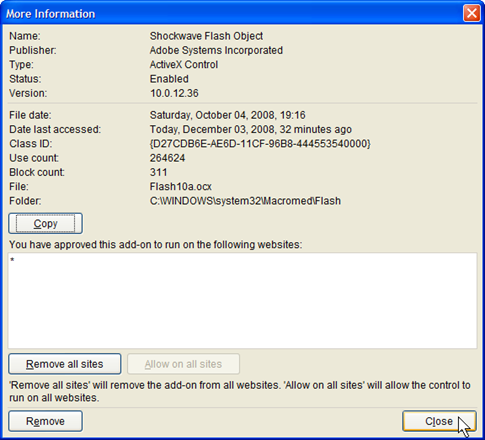
Labels: interoperability 2008-12-07WTF: Umm, Flash 10 Detection Not So SimpleJust after midnight coming into Saturday, 2006-12-06, I unloaded my sad experience with Flash Player detection since updating to Flash 10 in IE 8. The details are in the article “WTF: The Adobe Flash Version 1x Crisis.” After that, I created a question on Stack Overflow to explore the geek side of the problem. I just confirmed that the problem is more subtle than my original suspicions: Flash 10 Detection works in IE 8 beta 2 when I’m elevated to admin and it fails on many (but not all) sites when I am running as a Limited User Account (LUA). So I am seeing what may be a permissions problem that only shows up for users who browse as limited users on Windows XP SP3. This leaves two mysteries: (1) what is the permissions problem and (2) why does Flash detection work on some sites anyhow? Technorati Tags: Adobe Flash, Software Version Checking, software usability, software engineering, distributed applications, confirmable experience, system incoherence, StackOverflow, cybersmith Not Exactly What I Was Looking ForThanks to a lead from RoBorg on StackOverflow, I was given some useful leads on Flash Player detection resources. This led me to experiment with Adobe Flash Player Detection Kit 1.5. The Kit’s sample for client-side (that is, in-browser) detection failed, suggesting to me that this would be good code to explore for isolation of the problem. I began to conduct an autopsy on Adobe’s sample code. My first discovery in using the Client-Side Detection sample code is that the failure to detect Flash 10 is not about an incorrect comparison for desired-or-later version. The client-side detection doesn’t get that far. An internal procedure, GetSwfVer, for finding an installed version of Adobe Flash Player is unable to detect any Flash Player at all. So it reports that it failed to find any version installed. This had me suspect there is something going on with the Windows Registry (where I can see that there are entries for ShockWavePlayer, the Macromedia name that continues to be used). I can also see that there is an entry for Flash Player version 10. Internet Explorer also shows that it has the player installed and enabled when I check the Tools Manage Add-ons menu selection for all add-ons:
My plan is to dissect the GetSwfVer JavaScript and bench-test it by parts until I see where the procedure is failing to find the installed Flash Player control and report its version. I also have observed that the Adobe Flash Player Detection Kit and recommended detection methods have a poor reputation among some developers. I have no reliable evidence to support that. I will, however, also check into the recommended alternative, <swfobject>. If I find that it works where the Detection Kit Client-Side solution does not, that will be worth exploring for what the workaround is. There is a handy article by Bobby van der Sluis on the Adobe Development Center. The sample files there should get me started the same way I have made use of Detection Kit 1.5. Another Country Heard FromMeanwhile, I noticed that there is also support for Google Chrome. Chrome is the other in-beta browser I keep around to compare with IE 8 beta 2 results and to sometime use as an alternative for some sites that I just can’t get to work with IE 8 beta 2, even in compatibility mode. I managed to install Flash Player 10 for Google Chrome today. It turns out that Google uses plug-ins, not ActiveX controls, and the same plug-in that works with FireFox and other browsers sharing some of the same code base works with Chrome. It is actually tricky to get Chrome to install a plug-in, but I managed it.
This is a plug-in, not an ActiveX control, so its detection and use can be rather different. Nevertheless, I confirmed that Chrome will play Flash 10 for all of the sites where I am unable to have it work for Internet Explorer, including YouTube and the CBS Television NCIS program page. That solves my immediate desire to catch up on programs that I’ve missed. That makes me happy, as a program watcher. I still want to get to the bottom of this and complete my diagnosis of Flash Payer detection difficulties with Internet Explorer. A Small Matter of PrivilegeBecause I had to be running as administrator to install the Flash Player Plug-in, I first tested Chrome-based Flash Player detection and video playing while my Windows XP SP3 account was still elevated to administrator. Everything worked. As an afterthought, I also attempted to use IE 8 beta 2 under administrator privileges. It works!
But when I restore to my account to Limited User, it doesn’t:
Hmm, it doesn’t pick up the icon in the address bar either. IE 8 offers compatibility mode for this page, but it doesn’t make any difference to pretend to be IE 7 here. OK, What’s Next?I have solved the problem of being able to continue watching my favorite Internet-available programs. I have not solved the problem of client-side detection in IE8 and what about account privileges has detection work where it doesn’t when I am operating as a limited user. I will continue my dissection of available client-side code to isolate the problem and determine how some sites manage to get around the limitation I am experiencing. This business of having applications work while I am administrator and not as limited user is not new. I tend to associate this with my upgrade from Windows XP SP2 to SP3, and it may be related to more-recent security updates. I cannot be certain. I do know I have been putting up with this for some time. I am hopeful that if I get to the bottom of this one, I may be able to solve other problems (such as having a NewsGator Inbox plug-in for Outlook that only runs when I am administrator). As far as the specific problems of reliable Flash Player detection in IE8 go, I will continue to work on that as well, but not with the same urgency. Also, because anything I do from now on will be very geeky, I will provide an account on places like Professor von Clueless in the Blunder Dome and Stack Overflow, as appropriate. The Incoherence of Confirmable ExperienceAlthough I have wandered off into the weeds on this exploration, there are a number of examples of system incoherence, something where the web is a bountiful source of examples. The difficulty of confirming my experience and isolating it to something that is reproducible by others is also well-demonstrated here. I am also mindful that the reason there is no great hue and cry over Flash 10 detection problems is that I may be part of that select and small population of devoted LUA users who are seeing the problem at all. This is, of course, fodder for a different sort of rant. Labels: confirmable experience, cybersmith, interoperability, system incoherence, trustworthiness 2008-12-06WTF: The Adobe Flash Version 1x CrisisHad any problems with Flash Player version detection lately? Try updating to Adobe Flash Player Version 10. Prepare to be shocked by the poor quality of Flash version detection in the wild. After upgrading to a clean install of Adobe Flash 10, I discovered that nearly all video sites that worked for me in the past began denying that I had a version of Flash as good as what that they required. Still other sites deliver Flash video to me just fine and, on occasion, I am able to experience the higher quality HD streaming that some sites now support. It is amusing to see who fails to deliver video to me and what they have to say about it. I leave as an amusing puzzle how one determines what is going on and what the bug is likely to be. My suspicion is that the bug is hilariously simple yet spread like some sort of plague throughout the Internet. Technorati Tags: Adobe Flash, Software Version Checking, software usability, software engineering, distributed applications, confirmable experience, system incoherence, StackOverflow Adobe is experiencing its own version of the Y2k disaster, only in a simpler and more hilarious form. As far as I can tell, the problem is not Adobe’s. The difficulty is that many sites are completely unprepared for this version of the Flash Player. [2008-12-08T20:37Z update: Further analysis reveals that my particular problem is related to permissions in some way, not simply comparing version numbers incorrectly. I have no trouble with Flash 10 detection and playing when I am running as administrator. The difficulties arise only when running as a limited user. This doesn’t explain why I am successful some of the time as a limited user, and more forensic work is required. For details on the dissection so far, see “WTF: Umm, Flash 10 Detection Not So Simple.” Here’s how I experienced the widespread (for me) Flash 10 detection failure.
There you have it. I’m sure this is not pleasing for Adobe. Let’s just hope that the detection problem is not from an Adobe-provided sample of how to do it. [Update: It appears that the problem has been promulgated in Adobe-promoted materials.] [2008-12-06T19:20Z update: I went through and added links to the actual sites and videos where there is narrative. I also noted some successes where sites simply worked as expected.] Labels: confirmable experience, interoperability, software usability, system incoherence, trustworthiness, web site construction, web standards 2008-08-30Interoperability: The IE 8.0 DisruptionTechnorati Tags: interoperability, web standards, trustworthiness, IE8, usability, web site construction, compatibility I've elected to adopt the IE 8.0 beta 2 release as a tool for checking the compatibility of web and blog pages of mine. I see how disruptive the change to default standards-mode is going to be and how IE 8.0 is going to assist us. I need to dig out tools and resources that will help me mitigate the disruption and end up with standards-compliant pages as the default for new pages. Looking Over IE 8.0 beta 2I avoid beta releases of desk-top software, including operating systems and browsers. Because the standards-mode default of IE 8.0 is going to place significant demands on web sites, I also thought it time to install one copy of IE 8.0 simply to begin assessing all of my web sites and blog pages for being standard-compliant enough to get by. I am willing to risk use of beta-level software in order to be prepared for the official release in this specific case. I'm also sick of having IE 7.0 hang and crash on mundane pages such as my amazon.com logon. I'm hoping that even the beta of IE 8.0 will give me some relief from the IE 7.0 unreliability experience. And so far, so good. With the promotion of beta2 downloading this past week, I took the plunge. Installation was uneventful and all of my settings, add-ins, favorites and history were preserved. My existing home page, default selections, menus and tool bars were also preserved. [I am using Windows XP SP3 on a Windows Media Center PC purchased in September, 2005. IE 8.0 beta 2 also seems faster on this system in all of its modes.] I did not review much of the information available on IE 8.0, expecting to simply try it out.
My first surprise was a change to the address bar. There is a new format where all but the domain name of the URL are grayed. That was distracting for the first few days and it still has me stop and think. I realized this is the point: emphasizing the domain name so that people will tend to check whether they are where they expect to be. I like the idea, even though I have to look carefully and remember the full URL is there when I want to paste it somewhere or share the page on FriendFeed or elsewhere. I take this provision as one of those small details that demonstrates a commitment to safe browsing and confident use of the Internet.
Clicking the button causes it to be shown as depressed and the page is re-rendered as a loosely-standard page with the best-effort presentation and quirks renderings of IE 7.0 and earlier Internet Explorer releases. If you leave the button selected, the setting is remembered and automatically-selected on your next visits to the same domain. It stays that way until you unselect the button by clicking it again while visiting pages of that domain. It was this feature that tipped-me over in wanting to check out my own pages using beta2 (although I thought the button was tracked at the individual page level until I read the description of domain-level setting). By the way, if a page is detected to require a standards or compatibility mode specifically, no compatibility view option button is presented.The amazon.com site is this way from my computer, and so is Vicki's pottery-site home page. I looked at the source of the amazon.com site and confirmed that they are not using the special tag that requests that the compatibility view be automatic. I didn't check the HTTP headers to see if they are using that approach to forcing a compatibility or a standards-mode view. I know I did nothing of the kind on Vicki's site. This suggests to me that there is also some filtering going on in standards-mode rendering to notice whether a compatibility view should be offered. I'm baffled here. I am curious whether there is any browser indication when the compatibility view is selected by a web page tag or HTTP header. I suspect not and I'll have checked into that soon enough. I also checked out the InPrivate browsing feature, which, although popularly dubbed the "porn mode," is very useful when using a browser from a kiosk or Internet cafe and when making private on-line transactions from home. At this point, I am not interested in special features of IE 8.0 other than those related to improving the standards-compliant qualities of web pages and the browsing experience. I may experiment with other features later. My primary objective is to use the facilities of IE 8.0 and accompanying tools to improve the quality and longevity of my web publications. Once I have some mastery over web standards, I will look into accessibility considerations, another project I have been avoiding. Disrupting the State of the WebThe problem that IE 8.0 is intended to help resolve is the abuse of Postel's Law [compatibility view offered] that the web represents: "be conservative in what you do, be liberal in what you accept from others." The abuse arises when what you do is based on what is being accepted, with no idea what it means to be conservative. The web was and is an HTML Wild West and it is very difficult to enforce conservatism (that is, strict standards conformance in web-page creation). Since browsers also varied in what they accepted and then what they did with it, loosely-standard pages and loosely-standard browsers have been the norm and web pages are crafted to match up with the actual response of popular browsers. Since Internet Explorer is made the heavy in this story, we now get to see the price of changing over to "be strict in what is accepted and be standard in what is done with it." This is a very disruptive change. We'll see how well it works. Joe Gregorio argues that exceptions to Postel's Law are appropriate. Some, like Joel Spolski [no compatibility view], think it might be a little too late. There are already some who claim that the IE 8.0 Compatibility view is a sin against standardization [compatibility view offered], no matter that not many of the 8 billion and climbing pages out there are going to be made strictly-conformant any time soon. With regard to compatibility mode, I think it is foolish for it not to be there and Mary-Jo Foley is correct to wonder how much complainers are grasping at straws. It was surprising to me to observe how regularly the compatibility-view option button appears and how terribly much of my material renders in IE 8.0's standards mode. Apparently the button is there because IE 8.0 can't tell whether the page is really meant to be rendered via standards-mode or is actually a loosely-implemented page. I'm spending a fair amount of time toggling back and forth to see if there is any difference on sites I visit. This suggests to me that there is going to be a rude awakening everywhere real soon now. It is also clear to me that I don't fully understand exactly how this works, and I need to find a way to test the explanation on the IE blog and the discrepancies I notice, especially when the compatibility-view option is not offered and I know nothing special was done to accomplish that on the web page I am visiting. I am also getting conflicting advice when I use an on-line web-page validator. This change-over to unforgiving, default-standards-mode browsers is going to be very disruptive for the Internet. In many cases, especially for older, not-actively-maintained material, the compatibility view is the only way to continue to access the material successfully. There is a great deal of material for which it is either too expensive or flatly inappropriate to re-format for compatible rendering using strictly-standard features. Without compatibility view, I don't think a transition to standards mode could be possible. The feature strikes me as a brilliant approach to a very sticky situation. Although there is a way to identify individual pages as being loosely-standard and intended for automatic compatibility view, that still means the pages have to be touched and replaced, even to add one line to the <head> element of the HTML page. There are billions of pages that may require that treatment. Perhaps many of them will be adjusted. That will take time. Meanwhile, having the compatibility-view option and its automatic presentation is very important. There is also a way to adjust a web server to provide HTML headers that request a compatibility (or standards-mode only) view of all pages from a given domain. That strikes me as a desperate option to be used only when there is no intention of repairing pages of the site. I might do that temporarily, but only while I am preparing for a more-constructive solution that doesn't depend on compatibility view being supported into the indefinite future. The variations on the available forms of control (browser mode, DOCTYPE, HTTP header, and meta-tag) need to be studied carefully. I expect there to be confusion for a while, probably because I am feeling confused with the ambiguities in my experience so far. Another problem, especially with regard to IE 8.0 beta2, is that we don't reliably know how badly a loosely-standard page will render with a final standards-mode browser versus the terrible standards-mode rendering that beta2 sometimes makes at this time. It is conceivable that the degradation might not be quite so bad as it appears in beta2, but there is no way to tell just yet. The need for expertise and facility with semi-automated tools as part of preserving sites with standards-conforming web pages is probably a short-term business opportunity. The web sites that may be able to make the transition most easily may be those like Wikipedia, where the pages are generated from non-HTML source material. (That makes it surprising that Wikipedia pages currently provoke compatibility buttons and compatibility view is needed to do simple things like be able to follow links in an article's outline.) Mitigating IE 8.0To mitigate the impact of IE 8.0 becoming heavily used, it is necessary to find ways to do the least that can possibly work at once, and then to apply that same attitude in making the next most-useful change, and so on, until the desired mix of standards-compliant and loosely-compliant pages is achieved. To find out what tools are available along with IE8 beta 2, these pages provide some great guidance and resources:
That should point you to all of the resources you need to understand how to check sites, how to use the compatibility provisions, and other ways to take advantage of IE8 availability when it exits beta. I'm looking at a progression that will allow the following:
I will work out my own approach on Professor von Clueless, since I have definitely blundered my way into this. This post is also being used to identify the IE8 mitigation required for this blog, along with some other improvements:
When I update the template to force compatibility with the current loosely-standard blog-page generation, this post will reflect that too. [update 2008-08-30T16:42Z I had a few clumsy bits to clean up, taking the opportunity to elaborate further in some areas. The disruption with standards-mode web browsing is a great lesson for standards-based document-processing systems and office-suite migrations toward document interoperability. I'm going to pay attention to that from the perspective of the Harmony Principles too.] Labels: confirmable experience, IE8.0 mitigation, interoperability, trustworthiness, web site construction, web standards
from:
2008-07-07Interoperability: The Experience of ItTechnorati Tags: interoperability, coherence, integration, conceptual integrity, open systems. orcmid It strikes me that interoperability is a lower-level technical quality that impacts the higher-level undertakings of people, groups, and organizations. The connection between interoperability as a technical achievement and how its absence or limitation comes to be noticed is indirect. I wonder how important it is to sort that out. Here are my exploratory thoughts. Having Interoperability ConversationsIn April, on the Interoperability Conversations Forum, I asked:
The people who mention that forum thread to me echo the reply from N. Gregg Brown:
I hadn't meant to suggest a sequence. I am inclined to begin with how interoperability serves the activities of individuals and groups in their mutual endeavors. I will go so far as to claim that it is all about serving people in their endeavors and removing those barriers that lack of interoperability represents. There are some problems with that, though. How Is Interoperability Experienced?I don't think people experience interoperability or its absence in those terms. I think people experience the conceptual integrity of computer-based systems; they experience the coherence with which the elements of a system are familiarly usable; and, more likely, they experience frustrating absence of those qualities. And people do not identify and report their experiences in those terms. I think that what people stumble over is, among other defects, an absence of interoperability. It shows up as being frustrated in some task that interoperability is expected to enable. The arrangements for interoperability are subordinate to and invisible at the level where most of us interact with computer-based systems. The use of standard document formats is an easy example. When I am creating a document, my attention is not on the the digital representation of the document, it is on what the application allows me to do, how the document is presented to me, and what happens when I and others use the resulting electronic document. Even when there is a problem exchanging the document with someone else, I don't go digging into the format as a way of resolving the situation. And for most people, examining the digital format is out of the question. Digging into the computer software that is involved is more unlikely even if possible. Most of us are similarly unlikely to examine the communication protocols our computers are employing to connect and interact over the Internet. I think that interoperability is known to us mostly as an expected check-off item; it is not something we think about. Unless it doesn't work. At that point, the breakdown might be identified as an interoperability failure or not. Recognizing Layers and Flavors of InteroperabilityI do think there are layers of interoperability. When we talk of interoperability, it is important to be clear what the layer and the context are. I think we also must be clear about what aspect of interoperability matters. For example, are we after substitutability in the same layer or are we interested in substitutability above or below a layer. Is it ever not about substitutability? I also think that there are interoperability-related limitations that are experienced at a higher level where the (non-) interoperability contribution is not apparent. For me, this means that I must listen carefully for stories about interoperability. I must be careful in identifying the different layers or levels that are involved and where the interoperability matters. There's a lot of trial and error in sorting that out. The nagging question that remains is: how can interoperability be demonstrated in a way that is relevant at the other levels where its achievement (or failure) will be felt? Labels: interoperability 2007-10-08OpenOffice.org: Another Hot Tip![update 2008-10-13 The installer bug observed here is not specific to OpenOffice.org, it seems to be specific to installers. I have not examined this enough to see which installers do this, but I have seen the identical problem with installers of other software. In all cases, the software will correctly place a single-user install under the user who is running the install. But the dialog identifies the wrong user, apparently always showing the User ID for the first user created on the machine.] Technorati Tags: orcmid, OpenOffice.org, OO.o Installer Bug, confirmable experience, trustworthiness When I installed OO.o 2.3 on my sister's computer, I was disturbed that it kept offering her admin account as the single account it would install under, even though we were not running the installer under that account. At my XP SP2 system at home, I installed the same version and I did not have that problem. This time it did name the account I was using, even though it was not my normal administrator account. It was, however, the first account that had been set up on my machine, as was the case for admin on my sister's machine. So I tried again, this time on my Tablet PC and Windows Vista Ultimate. For variety, I also used the OO.o 2.1 Novell edition, installing from CD-ROM. There, I ran into exactly the same problem. I was presented with this dilemma:
Once again, me is not admin. I am doing this install from my standard-user account (SUA). But just to see what would happen, I took that option anyhow. Guess what: This dialog is lying. It will install only for the account being used. The bug is that it doesn't present the correct account name. The behavior is actually correct. So if you are attempting to install OpenOffice.org 2.3 (or the 2.1 Novell Edition) only under the account you are running in, you can ignore the incorrect account name. It will do the right thing. The next time I assist my sister in adding an OpenOffice.org update, I'll be sure to uninstall the current version and then install the new one only for her standard account. Now, you might wonder what the fuss is all about. If you are as obsessive as I am about computer security, you might want to omit all but pure administrative applications from the administrative account, and only ever use the administrative account for essential administrative operations. This means that to have ordinary applications install properly in the ordinary accounts where it is safest to run them I elevate my standard-user account to an administrator account just long enough to install the software and run it the first time under the standard account. This gyration is required because many programs expect to perform final administrative setup operations on the first execution. Setting of registry entries and creation of application data, plus other details, may be specific to the account that is used for the install. I will usually discover the firewall conditioning that is required upon the first execution. From then on, I can use the program as a standard user. When certain programs (e.g., Second Life) install for all users with no other option, I will remove the shortcuts and links placed on the "All Users" desktop and startup menu and place them in the profile information of my standard user account. This is just a little preventative against my foolishly using recreational software from my administrative account. [update 2008-10-13 Moved this post from Orcmid’s Live Hideout to Orcmid’s Lair for better preservation and tie-in to other confirmable-experience and cybergeek topics.] Labels: confirmable experience, cybersmith, interoperability, software usability |
||||||||||||||||||||||||||||||||||||







 What I was looking for, and saw immediately, is the new

|
You are navigating Orcmid's Lair. |
template
created 2002-10-28-07:25 -0800 (pst)
by orcmid |